
Tag: Filters

Netex Cloud. November 2026 First release

Netex Cloud. November 2026 First release

New features

SHARE

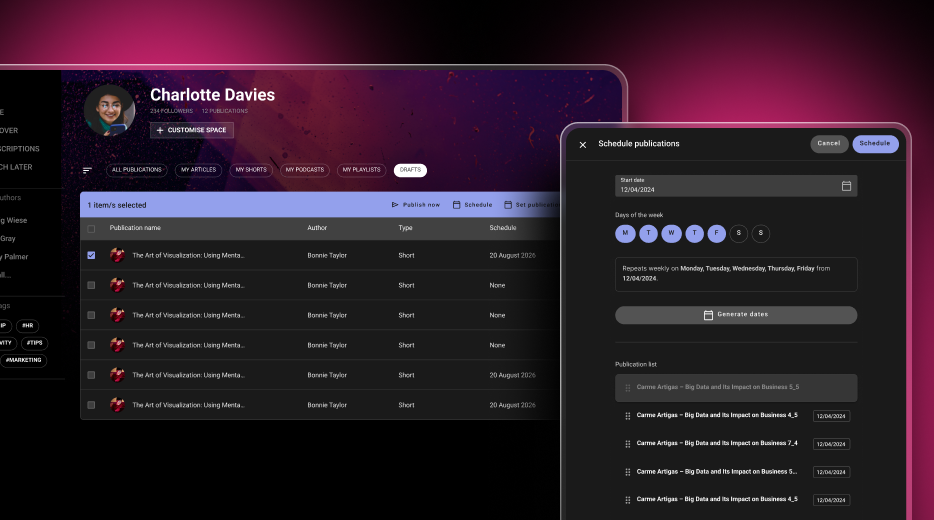
Schedule your posts and keep your platform active

Create all your content in one go and decide when it goes live. The new drafts table lets you see every publication date at a glance, publish straight away, assign the same date to several posts or stagger them (for example, on Mondays, Wednesdays and Fridays). If you change the order, the dates are recalculated automatically, and the platform publishes the scheduled content each night. Give your users a reason to come back every day.

SHARE

A new Schedule button when creating content

When you write an article or create any other post, choose the day you want it to appear. It is saved as a draft and published automatically on the selected date.

SHARE

Unsplash images, without leaving Share

Find an image you like, crop it and use it in your posts and playlists. Spend less time searching for photos and give every cover a better look.

Improvements

DRIVE

Find your files by format

Use the new resource type filter to show only PDFs, or videos and audio files together. It also works in the Recent view, where you can see everything you have access to, across all libraries.

DRIVE

Location: reach the library of any file in one click

Found a file but cannot remember where it belongs? The Location option in its menu now takes you straight to its library.

What we are working on now

Customise your mandatory and required labels

Soon you will be able to choose the wording that best fits your organisation in the customisation settings.

Select all in your lists

Apply actions to multiple items at once in your content, course, event, learning path, programme and course offering lists.

More complete events

Integrated time slots and satisfaction surveys, also designed to help meet Fundae requirements.

A refreshed Skills Manager

A new administration experience and competency assessments that employees will be able to view from the LMS.

Your AI assistant, always within reach

A shortcut to get help from AI assistants anywhere on the platform, with the context of what you are doing.
Netex Cloud. October 2026 Second release

Netex Cloud. October 2026 Second release

New features

SHARE + DRIVE

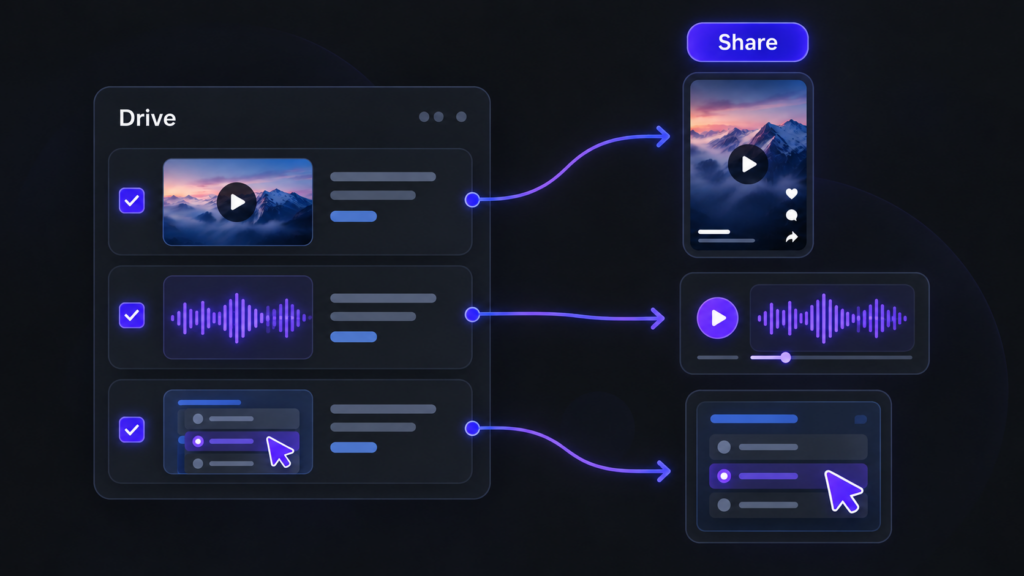
Reuse your content without uploading it again

Reutiliza vídeos, audios y recursos interactivos de Drive para crear contenido en Share.

When creating a short, a podcast or an interactive activity, you can now select the video, audio or resource directly from your Drive libraries. You’ll see the most recent resources first and can browse your libraries whenever you need to. The browser only shows resources that match the type of content you’re creating. And, of course, you can still record or upload files as usual.

LEARN

Challenges that show you the way

Within each challenge, you can now see which other challenges each course or learning path contributes to. This helps you identify the training that offers the most value at a glance. Click the challenge icon to open the content details and see all the challenges it belongs to.

AUTOMATE

Automatically mark courses and events as complete

Set up rules to mark courses or events as complete automatically. For example, when someone completes one course, you can automatically mark a second course as complete. This enables fast-track processes and automatic recognition of equivalent training.

This first version supports courses and events only. The completion date will be the date the process runs, rather than the date of the action that triggered the rule, and no learning time will be recorded. Events will be marked as complete without recording attendance.

Improvements

LEARN

Your professional development, one step closer

Your profile now takes you straight to your job position, with no extra clicks. If you have more than one position, you can switch between them using tabs. We’ve also refined the profile design, and your certificates now appear in a list that’s easier to browse.

SHARE

Publish, step by step

We’ve redesigned the publishing forms with a guided wizard: first, choose your material, then add the cover image, title and description. A clearer, faster process with a fresh look for shorts, podcasts, links, articles, interactive activities and playlists.

SHARE

See articles just as your learners will

The new article editor shows you the final result as you write, with all the formatting tools close at hand. What you see is what gets published.

SHARE

Link details, filled in automatically

Paste a URL and Share automatically retrieves the title and image. Want something different? You can change them in moments.

SHARE

Cover images, your way

Choose the video frame that best represents your content or upload your own image, using an improved image picker.

LEARN

Filter and sort your challenges

Filter the content within a challenge by enrolment type (mandatory or recommended) and session status (open or closed), and sort it alphabetically.

News on filters and Reports upgrades

News on filters and Reports upgrades

Release date: Wednesday, January 4th.

New pathway report tool

Discover the new pathway report tool that displays the progress data for all the trainings on pathways at the same time, generate a list with the trainings you want and quickly view the information on its evolution: start and end dates, current status, progress of students…

More information.

New filters on report of users progress

From now on, on user reports we offer options to filter the list results in the Open filters tool by course and range of dates.

More information.

New required courses field in the Pathway progress

In the Summary Pathway Progress tab, within the training, the Courses completed field splits into two categories to distinguish how many of them are required to overcome the formation.

Más información.

News on course filters

News on course filters

Release date: 20th December 

New reports and filters.

We introduce course report, a new reporting tool that allows customers to see the progress data for all the trainings of a course at the same time, generate a list with the trainings you want and quickly view the information on its evolution:

  • start and end dates,
  • current status,
  • progress of students.

More info.

Filter by Extended fields in Users report.

From now on customers will also find more options when filtering the results of the list in the Open filters tool. New search fields related to user information (course, status, progress…) will be avaliable, starting with user Extended fields.

More info. 

learningCloud 5.17.1 – Validation at the training level and new author filter.

learningCloud 5.17.1 – Validation at the training level and new author filter.

Validation at training level

Until now, if a user was enrolled in a sprint or channel training that they had previously completed, the platform automatically validated the enrolment in the new training and the user did not need to complete it again.

Now administrators and group administrators can decide, when creating a new training, whether it is validatable or not. The default behaviour will be the current one (it will be validatable) but they will be able to change this behaviour so that users who register for this new training will have to complete it again.

In many occasions an employee must re-complete a training to obtain an annual certification. In this type of scenario it is necessary to deactivate the option “validations” in the training.

Filtering by author in the sprints and channels list

We have added a new filter in the screen that shows the list of sprints and in the screen that shows the list of channels to allow filtering by author.

This way it is possible to display all the sprints or channels that have been created by a specific author.

learningCloud 5.16.5 – New filter in the list of channels

learningCloud 5.16.5 – New filter in the list of channels

New filter in the list of channels and sprints.

For all those customers with the Multiorganisation addon activated, a new filter has been added to allow searching for Sprints and channels within a catalogue.

New author field in the sprint list

A new field has been added in the sprint list to show who is the creator of the sprint.

Logo customisation in the student portal

With this functionality, learningCloud customers will be able to upload their own logo or image to learningCloud to be displayed in the learner portal.

Esta es la página de Novedades de Netex Cloud. Para conocer el producto en profundidad, visita:

Ir a Netex Cloud