
Tag: Sprints

learningCloud 4.5.5 – Pathways with stages

As an administrator

The Pathways tool allows the creation of training itineraries by establishing blocks between Sprints to determine prerequisites between training content. From version 4.5.5 stages are established within Pathways.

Establishing stages allows to divide the training content and establish more flexible learning paths. Within each stage, at least one Sprint is required and there can be as many Sprints as we want. Stages establish blocks between each other. If you want to advance to the next stage you must have done (and completed) all Sprints marked as required in the previous stage.

In each stage there is no mandatory order for the completion of Sprints. Sprints can be performed in any order, only the order “recommended” by the administrator when establishing the list of Sprints will be part of a stage.

To change the order of the Sprints, simply drag & drop the Sprints to the desired position.

The Pathway may or may not have an associated badge that would be assigned after the Pathway is completed. If the requirements change during the process, i.e. if we increase the number of required Sprints or decrease the progress of the Pathway is calculated dynamically so that only students who have not completed the Pathway are affected.

As a student

A student when accessing their Pathway will see those Sprints belonging to the same stage unlocked and those belonging to a subsequent stage blocked.

As the students complete the Sprints, the next stages will be unlocked.

Students can view their progress and the Pathway badges any time.

One of the improvements introduced in this new release is that Sprints that belong to a pathway and are blocked, although they appear on the carousels, cannot be accessed.
learningCloud 5.18 – Setting pre-requisites (milestones) between sprints within a channel

On 14 September we will deploy the new version of learningCloud (5.18) whose most important new features are:

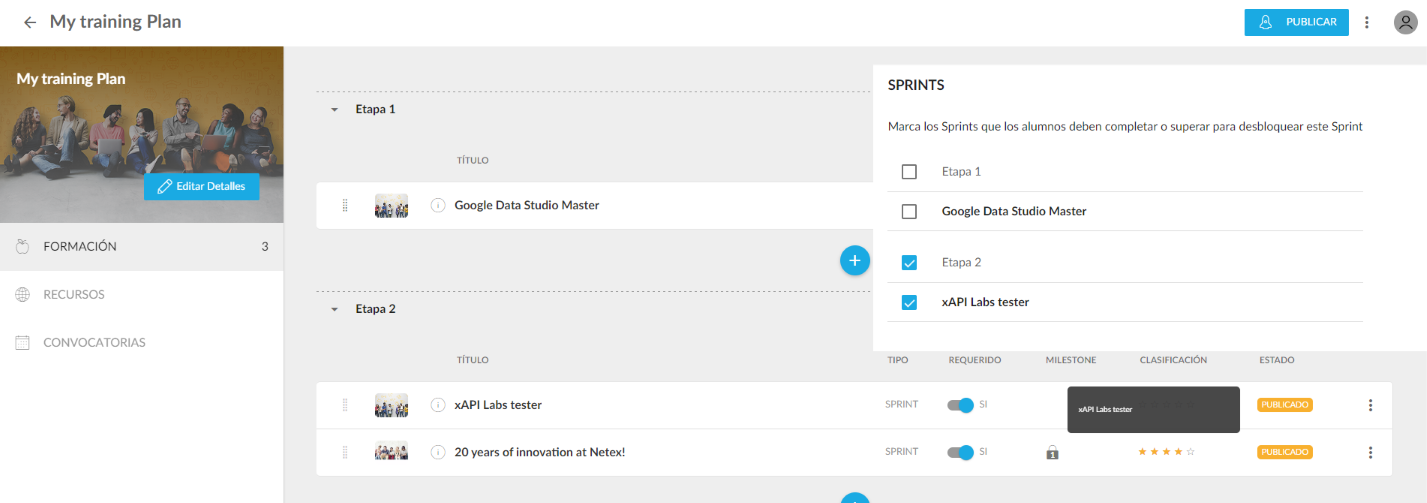
Setting pre-requisites (milestones) between sprints within a channel

Until this version, navigation between stages of a channel was sequential. A user had to complete all the required sprints of a stage before moving on to the next one. From this version onwards, the channel author can customise the navigation and set the pre-requisites for each sprint. For example, for the second sprint of stage 2, he could set as a pre-requisite:

  • Complete all the sprints in stage 1
  • Complete some sprints on stage 1
  • Complete the previous sprints in stage 2
  • No prerequisites

From this version onwards, sequential navigation will no longer be enabled by default but all channels created before this version will keep the previous behaviour, i.e. a user must complete all required sprints of a stage before moving on to the next one.

If you create a new channel, don’t forget to set the pre-requisites.

learningCloud 5.16.5 – New filter in the list of channels

New filter in the list of channels and sprints.

For all those customers with the Multiorganisation addon activated, a new filter has been added to allow searching for Sprints and channels within a catalogue.

New author field in the sprint list

A new field has been added in the sprint list to show who is the creator of the sprint.

Logo customisation in the student portal

With this functionality, learningCloud customers will be able to upload their own logo or image to learningCloud to be displayed in the learner portal.