Now, when a learner views the detail page of a training —for a course, event, learning pathway or learning program— they can see who the assigned trainer or teacher is.
Improvements
LMS
Warning before leaving to external links
Learning pathways and trainings allow adding links to external websites, and that remains unrestricted for administrators. But now, when a user is about to click one of those links, they’ll see a warning indicating they’re about to leave the platform —with the option to continue or cancel—. One more step in reinforcing the platform’s security.
Challenges now allow you to configure which completions are taken into account to calculate progress:
Completions made between the challenge start and end dates
Completions made up to the challenge end date
✔︎ This gives you more control to adapt challenges to different business and tracking needs.
Credential recertification
At Netex Cloud, we are taking another step forward to promote continuous learning. You can now configure credentials with an expiration date and activate automatic recertification processes, ensuring that your teams’ skills are always up to date.
What does this new functionality include?
Configurable credential validity. Define how long a credential will remain active (for example, 6 months) and ensure knowledge stays current.
Automatic notifications before expiration. Learners receive advance reminders to renew their credential without interruption.
Automatic recertification through an exam or course. Set up automatic enrollment rules so that users with expired credentials can move directly into the renewal process.
New credentials dashboard. See which credentials are active or expired and make strategic, data-driven decisions.
What does it mean for your organization?
More control and visibility
Less manual management
Teams that are always up to date
Greater value and credibility for your certifications
With this new functionality, credentials in Netex Cloud are no longer static and become a living tool to support continuous professional development.
✔︎ This gives you more control to adapt challenges to different business and tracking needs.
Desired job roles
Learners can now add and remove desired job roles from their profile, as long as this option is enabled for their tenant.
A feature designed to provide more personalization and greater value in tracking professional development.
Expanded information in pathway seat reservations
Pathway sales sessions now display more information about seat availability and status, giving users a clearer view at a glance.
Points hidden when gamification is not active
When gamification is disabled, points are no longer displayed, avoiding confusion and maintaining a more consistent experience.
Improve your events and give your users new goals.
Setting the right milestones for your learners is essential to optimize the learning experience and ensure they achieve their objectives.
Thanks to event completeness, you can now:
Set different achievement criteria for each event, adapted to your educational plan.
Set up pathways to mark events as required and ensure that users complete key steps in their training.
Track the overall progress of your team without hassle
With this feature you’ll also get a detailed assessments to adjust your training strategies, reinforce critical topics and provide better support for those who need it.
Discover the new pathway report tool that displays the progress data for all the trainings on pathways at the same time, generate a list with the trainings you want and quickly view the information on its evolution: start and end dates, current status, progress of students…
New required courses field in the Pathway progress
In the Summary Pathway Progress tab, within the training, the Courses completed field splits into two categories to distinguish how many of them are required to overcome the formation.
From this version onwards, administrators will be able to create extended fields for training pathways. The purpose of these fields is to help classify and find content more efficiently.
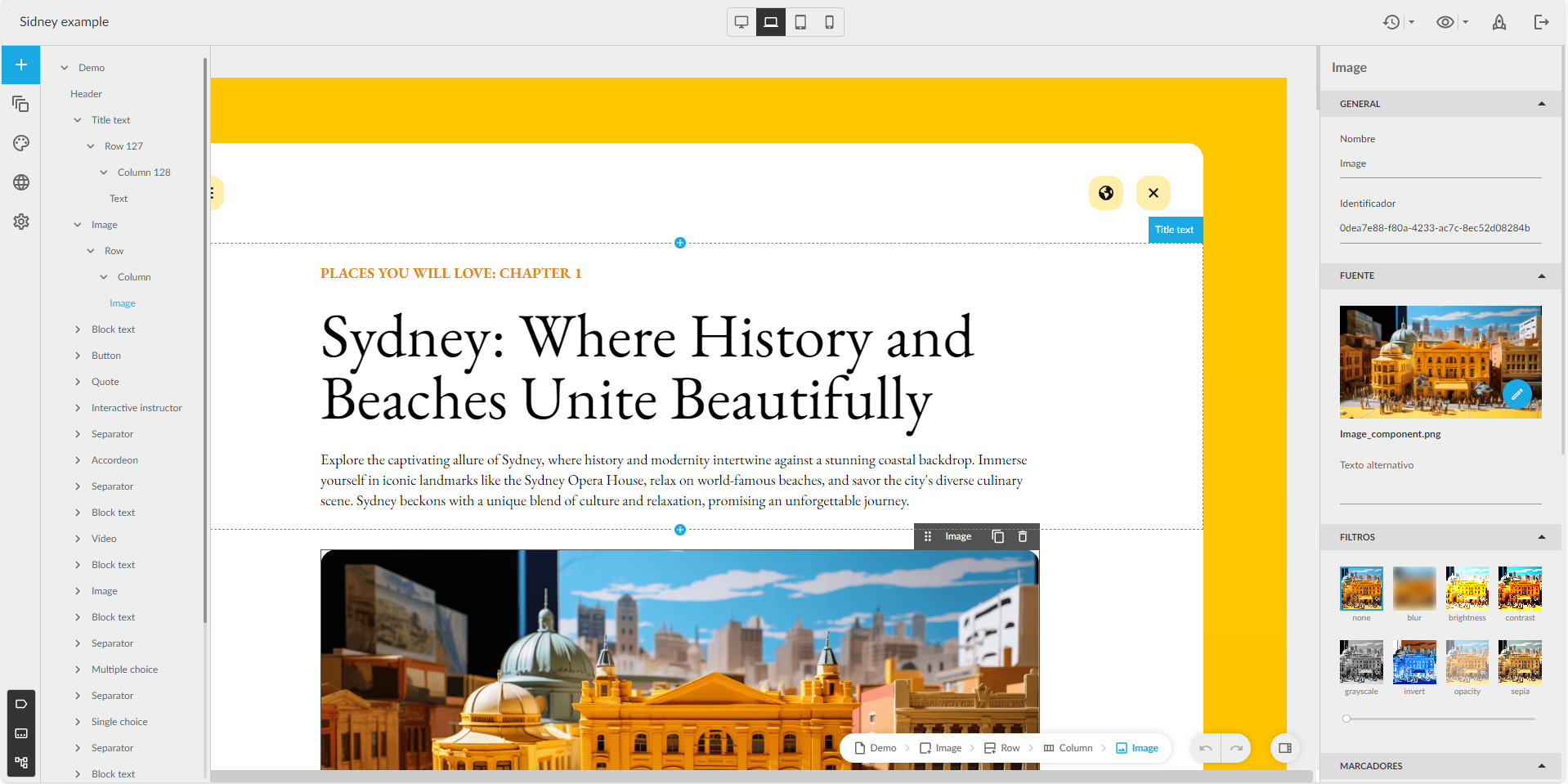
The 1 series of themes is growing. In addition to the Sidney theme, we now have the Lisbon, Porto and Osaka themes, a series of themes designed to quickly create attractive, interactive content that will look great on any device where it is launched (both mobile devices and desktop and laptop computers), simply by choosing and dragging the different content blocks available: texts, images (with areas and markers) interactive videos, accordions, tabs, galleries, and a variety of questions: single answer, multiple answer, free text, relate items, sort list, drag over image, likert.
Valid for any subject. It is possible to create content in any of the themes of series 1, and change it for another of the same series a posteriori.
Component tree
Now authors with a Professional licence can see the tree with the structure of the components in a new panel, to know their hierarchy, and to be able to move them more comfortably.
Improved buttons
The buttons can be configured so that the content does not allow the learner to move on to the next page, or be considered completed, until the learner interacts (clicks) on the buttons that the author considers. Also with the advanced buttons.
Events is now integrated with MS Outlook and MS Teams. LMS automatically generates a virtual room in Teams when creating an event, and adds a training session to the calendar of all registered users.
Once the event is over, the teacher can synchronize the attendance data between LMS and Teams, showing which users attended and for how long.
In some projects we find trainings that are addressed to all the learners, with the new “public training” feature, all the learners in the tenant will be able to see the training and the learner decides whether to enrol or not (instead of selecting them, selecting a group or uploading a CSV). This will allow any current or future user to see the training and register.
At the moment we have 2 ways to create trainings:
Directed: learners are enrolled individually or by group and they will see the training “My learning” carousel
Free: learners are recommended individually or by group. they will see the training in the “Recommended” carousel and the learner decides whether to enrol or not.
We have also added the possibility to select the nature of a training for a user or a group of users: Mandatory, optional or recommended.
The Pathways tool allows the creation of training itineraries by establishing blocks between Sprints to determine prerequisites between training content. From version 4.5.5 stages are established within Pathways.
Establishing stages allows to divide the training content and establish more flexible learning paths. Within each stage, at least one Sprint is required and there can be as many Sprints as we want. Stages establish blocks between each other. If you want to advance to the next stage you must have done (and completed) all Sprints marked as required in the previous stage.
In each stage there is no mandatory order for the completion of Sprints. Sprints can be performed in any order, only the order “recommended” by the administrator when establishing the list of Sprints will be part of a stage.
To change the order of the Sprints, simply drag & drop the Sprints to the desired position.
The Pathway may or may not have an associated badge that would be assigned after the Pathway is completed. If the requirements change during the process, i.e. if we increase the number of required Sprints or decrease the progress of the Pathway is calculated dynamically so that only students who have not completed the Pathway are affected.
As a student
A student when accessing their Pathway will see those Sprints belonging to the same stage unlocked and those belonging to a subsequent stage blocked.
As the students complete the Sprints, the next stages will be unlocked.
Students can view their progress and the Pathway badges any time.
One of the improvements introduced in this new release is that Sprints that belong to a pathway and are blocked, although they appear on the carousels, cannot be accessed.
On 14 September we will deploy the new version of learningCloud (5.18) whose most important new features are:
Setting pre-requisites (milestones) between sprints within a channel
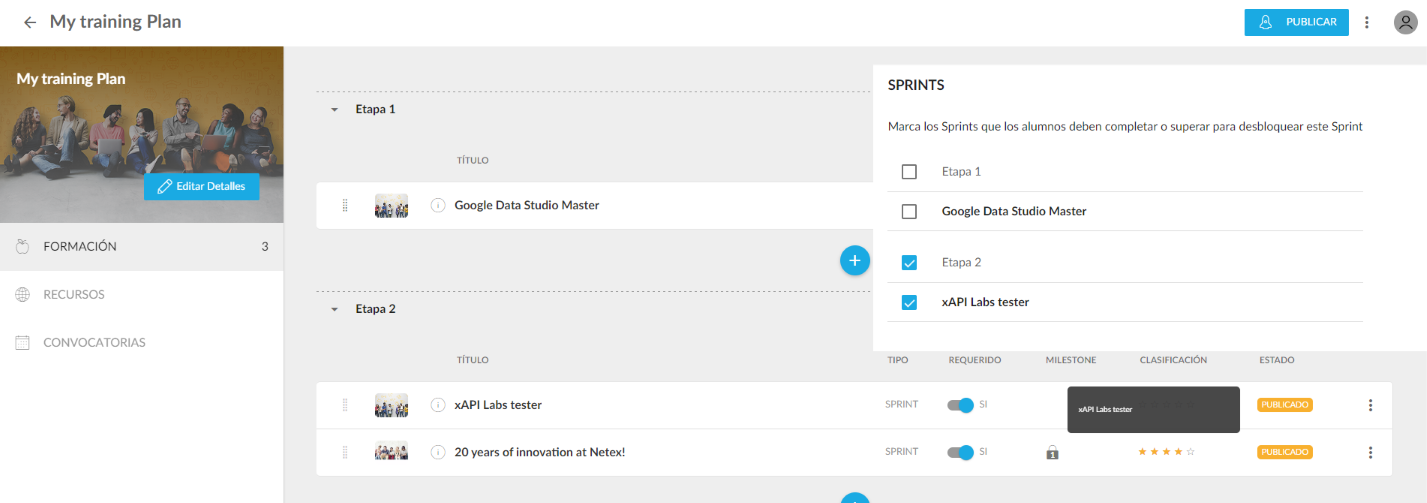
Until this version, navigation between stages of a channel was sequential. A user had to complete all the required sprints of a stage before moving on to the next one. From this version onwards, the channel author can customise the navigation and set the pre-requisites for each sprint. For example, for the second sprint of stage 2, he could set as a pre-requisite:
Complete all the sprints in stage 1
Complete some sprints on stage 1
Complete the previous sprints in stage 2
No prerequisites
From this version onwards, sequential navigation will no longer be enabled by default but all channels created before this version will keep the previous behaviour, i.e. a user must complete all required sprints of a stage before moving on to the next one.
If you create a new channel, don’t forget to set the pre-requisites.