
New features
SHARE
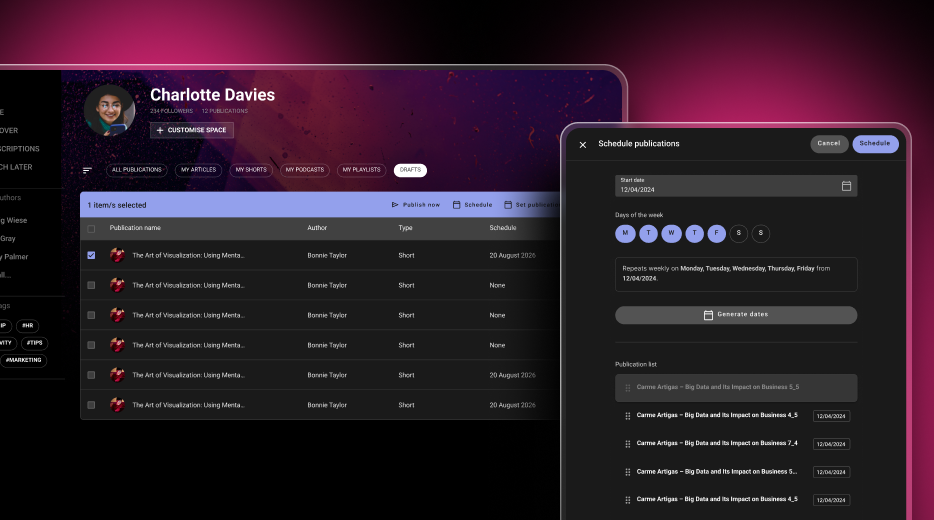
Schedule your posts and keep your platform active
Create all your content in one go and decide when it goes live. The new drafts table lets you see every publication date at a glance, publish straight away, assign the same date to several posts or stagger them (for example, on Mondays, Wednesdays and Fridays). If you change the order, the dates are recalculated automatically, and the platform publishes the scheduled content each night. Give your users a reason to come back every day.
SHARE
A new Schedule button when creating content
When you write an article or create any other post, choose the day you want it to appear. It is saved as a draft and published automatically on the selected date.
SHARE
Unsplash images, without leaving Share
Find an image you like, crop it and use it in your posts and playlists. Spend less time searching for photos and give every cover a better look.
Improvements
DRIVE
Find your files by format
Use the new resource type filter to show only PDFs, or videos and audio files together. It also works in the Recent view, where you can see everything you have access to, across all libraries.
DRIVE
Location: reach the library of any file in one click
Found a file but cannot remember where it belongs? The Location option in its menu now takes you straight to its library.
What we are working on now
Customise your mandatory and required labels
Soon you will be able to choose the wording that best fits your organisation in the customisation settings.
Select all in your lists
Apply actions to multiple items at once in your content, course, event, learning path, programme and course offering lists.
More complete events
Integrated time slots and satisfaction surveys, also designed to help meet Fundae requirements.
A refreshed Skills Manager
A new administration experience and competency assessments that employees will be able to view from the LMS.
Your AI assistant, always within reach
A shortcut to get help from AI assistants anywhere on the platform, with the context of what you are doing.
Netex Cloud. November 2025 First Release.
SHARE
Publish when you choose
Now, in our knowledge-sharing tool, you can save a post as a draft, ensuring that it is not visible to the people subscribed to the playlist until you decide to publish it.
AI Author with human review
If you use the AI Author feature, you can configure it so that automatically generated posts are not published directly, but are instead saved as drafts. This way, a human author can review them, improve them, and decide the exact moment of publication.
AUTHOR
Improvements in the content review process
The content review process in Netex Cloud’s authoring tool is now more agile, clearer, and more collaborative. We have redesigned this workflow to make the work of both authors and reviewers easier, avoiding bottlenecks and accelerating every stage of the process.
Comments and tasks directly on the content
Reviewers can add comments and create change tasks directly on the content itself, making communication and adjustment management much more direct and organised.
Temporary unit locking
To avoid simultaneous edits, authors can temporarily lock a unit while they are working on it. Fewer interferences, more peace of mind.
Faster navigation during review
During this process, sequential navigation can be unlocked to quickly access the last pages. This helps speed up reviews and move forward faster than ever.