
Tag: Formats

Netex Cloud. November 2026 First release

Netex Cloud. November 2026 First release

New features

SHARE

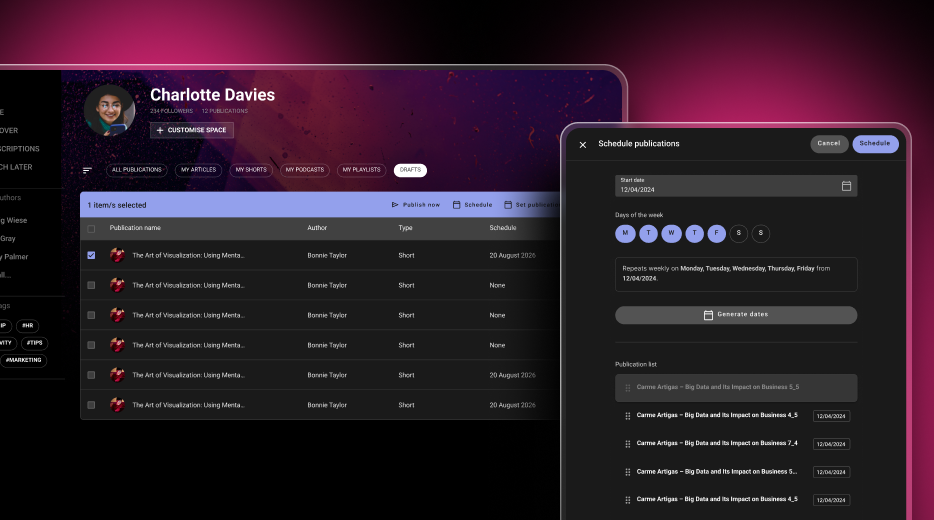
Schedule your posts and keep your platform active

Create all your content in one go and decide when it goes live. The new drafts table lets you see every publication date at a glance, publish straight away, assign the same date to several posts or stagger them (for example, on Mondays, Wednesdays and Fridays). If you change the order, the dates are recalculated automatically, and the platform publishes the scheduled content each night. Give your users a reason to come back every day.

SHARE

A new Schedule button when creating content

When you write an article or create any other post, choose the day you want it to appear. It is saved as a draft and published automatically on the selected date.

SHARE

Unsplash images, without leaving Share

Find an image you like, crop it and use it in your posts and playlists. Spend less time searching for photos and give every cover a better look.

Improvements

DRIVE

Find your files by format

Use the new resource type filter to show only PDFs, or videos and audio files together. It also works in the Recent view, where you can see everything you have access to, across all libraries.

DRIVE

Location: reach the library of any file in one click

Found a file but cannot remember where it belongs? The Location option in its menu now takes you straight to its library.

What we are working on now

Customise your mandatory and required labels

Soon you will be able to choose the wording that best fits your organisation in the customisation settings.

Select all in your lists

Apply actions to multiple items at once in your content, course, event, learning path, programme and course offering lists.

More complete events

Integrated time slots and satisfaction surveys, also designed to help meet Fundae requirements.

A refreshed Skills Manager

A new administration experience and competency assessments that employees will be able to view from the LMS.

Your AI assistant, always within reach

A shortcut to get help from AI assistants anywhere on the platform, with the context of what you are doing.

Netex Cloud. May 2026 First Release

Netex Cloud. May 2026 First Release

EXPERTS

Video and audio files now supported from Drive

Until now, Experts could index Drive content in PDF, SCORM or xAPI format. From this release, that capability extends to multimedia content: videos and audio files.

This makes it much easier to leverage materials such as recorded training sessions, video pills, podcasts, internal explainers or supplementary content. More supported formats means more knowledge within reach for your users.

NETEX CLOUD

Four new languages now available

Netex Cloud adds new languages to keep expanding its international reach: Serbian, Croatian, Bosnian and Montenegrin. This update marks another step in our expansion across Eastern Europe, delivering a closer, more localised experience for users in these markets.

Netex Cloud. March 2026 Second Release

Netex Cloud. March 2026 Second Release

Code blocks in the Authoring tool

You can now insert source code blocks directly into content created with Author.

✔︎ Clearer, more professional content that’s much easier to read.

More supported file types in Drive

We’ve expanded the range of supported formats in Drive, so you can work with more resource types from a single place.

New supported formats:

  • Office documents: spreadsheets, presentations and text documents
  • Audio files: such as MP3, WAV and other common browser-compatible formats

For audio files, an integrated player is now available, allowing users to listen directly within the platform. 🎧

✔︎ Greater flexibility to adapt learning assets to different business and tracking needs.

Experts can now use content from Drive

The Experts functionality takes another step forward: it is now possible to add knowledge from Drive directly into an Expert.

Experts can currently use the following as knowledge sources:

  • PDF
  • SCORM
  • xAPI

This enables more enriched responses, combining content not only from the LMS but also from Drive—always respecting each user’s access permissions.

✔︎ More powerful Experts, better connected to your resources and more effective in answering real-world questions.

New tag-based search filter in the LMS

A new search criterion has been added to the LMS: tag-based search.

Users can now find content more precisely using associated tags, in the same way they already do with other search fields.

✔︎ Faster and more intuitive access to the right learning content.

Note: this functionality is available in environments already using the latest version of carousels/search.

Redesigned job role view

The job roles screen has been redesigned to provide a more visual and intuitive experience. Key improvements include:

  • Updated colour scheme for easier reading
  • Visual indicators of current and target levels for each competency
  • More detailed insights when selecting a competency
  • Direct access to related content to continue improving each skill

✔︎ Result: clearer progress visibility and more effective navigation.

Esta es la página de Novedades de Netex Cloud. Para conocer el producto en profundidad, visita:

Ir a Netex Cloud