
Tag: Libraries

Netex Cloud. November 2026 First release

Netex Cloud. November 2026 First release

New features

SHARE

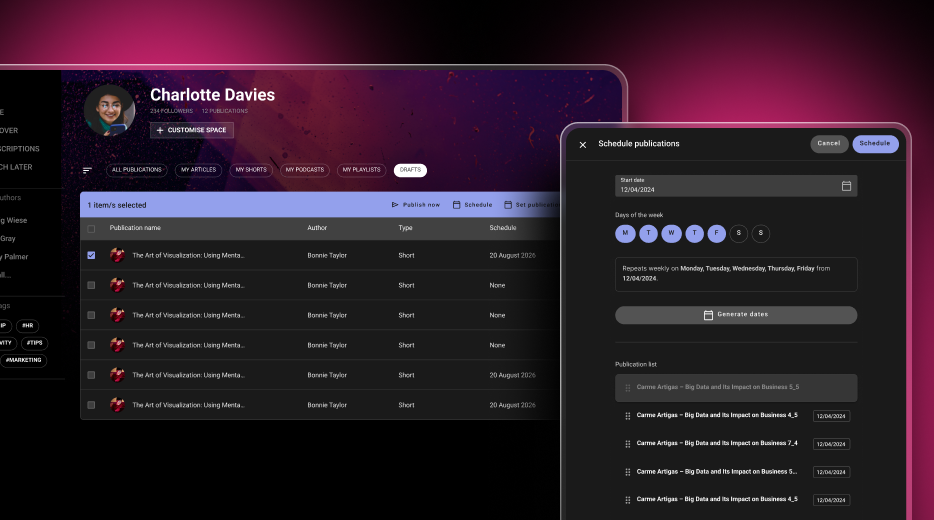
Schedule your posts and keep your platform active

Create all your content in one go and decide when it goes live. The new drafts table lets you see every publication date at a glance, publish straight away, assign the same date to several posts or stagger them (for example, on Mondays, Wednesdays and Fridays). If you change the order, the dates are recalculated automatically, and the platform publishes the scheduled content each night. Give your users a reason to come back every day.

SHARE

A new Schedule button when creating content

When you write an article or create any other post, choose the day you want it to appear. It is saved as a draft and published automatically on the selected date.

SHARE

Unsplash images, without leaving Share

Find an image you like, crop it and use it in your posts and playlists. Spend less time searching for photos and give every cover a better look.

Improvements

DRIVE

Find your files by format

Use the new resource type filter to show only PDFs, or videos and audio files together. It also works in the Recent view, where you can see everything you have access to, across all libraries.

DRIVE

Location: reach the library of any file in one click

Found a file but cannot remember where it belongs? The Location option in its menu now takes you straight to its library.

What we are working on now

Customise your mandatory and required labels

Soon you will be able to choose the wording that best fits your organisation in the customisation settings.

Select all in your lists

Apply actions to multiple items at once in your content, course, event, learning path, programme and course offering lists.

More complete events

Integrated time slots and satisfaction surveys, also designed to help meet Fundae requirements.

A refreshed Skills Manager

A new administration experience and competency assessments that employees will be able to view from the LMS.

Your AI assistant, always within reach

A shortcut to get help from AI assistants anywhere on the platform, with the context of what you are doing.
Netex Cloud. October 2026 Second release

Netex Cloud. October 2026 Second release

New features

SHARE + DRIVE

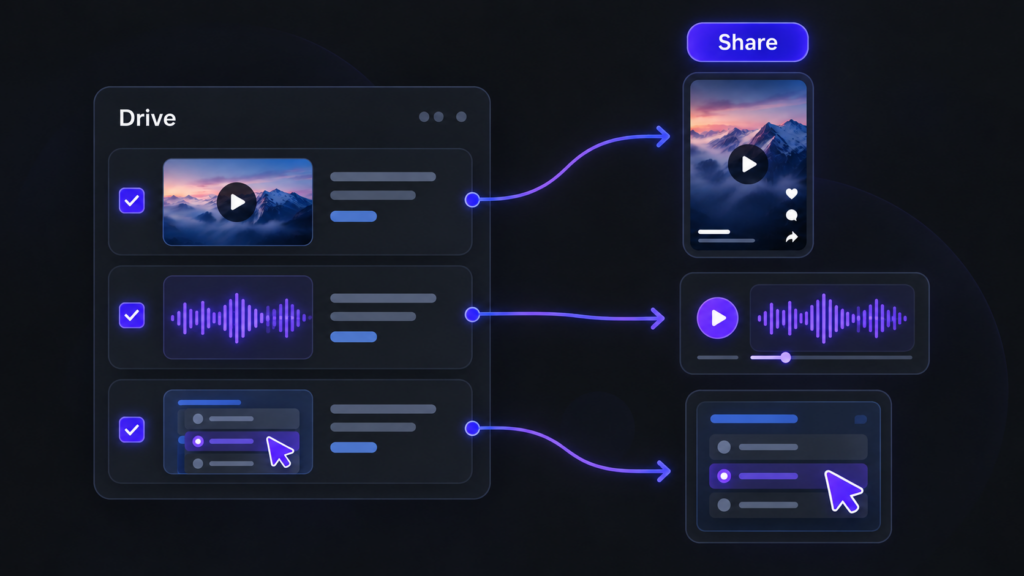
Reuse your content without uploading it again

Reutiliza vídeos, audios y recursos interactivos de Drive para crear contenido en Share.

When creating a short, a podcast or an interactive activity, you can now select the video, audio or resource directly from your Drive libraries. You’ll see the most recent resources first and can browse your libraries whenever you need to. The browser only shows resources that match the type of content you’re creating. And, of course, you can still record or upload files as usual.

LEARN

Challenges that show you the way

Within each challenge, you can now see which other challenges each course or learning path contributes to. This helps you identify the training that offers the most value at a glance. Click the challenge icon to open the content details and see all the challenges it belongs to.

AUTOMATE

Automatically mark courses and events as complete

Set up rules to mark courses or events as complete automatically. For example, when someone completes one course, you can automatically mark a second course as complete. This enables fast-track processes and automatic recognition of equivalent training.

This first version supports courses and events only. The completion date will be the date the process runs, rather than the date of the action that triggered the rule, and no learning time will be recorded. Events will be marked as complete without recording attendance.

Improvements

LEARN

Your professional development, one step closer

Your profile now takes you straight to your job position, with no extra clicks. If you have more than one position, you can switch between them using tabs. We’ve also refined the profile design, and your certificates now appear in a list that’s easier to browse.

SHARE

Publish, step by step

We’ve redesigned the publishing forms with a guided wizard: first, choose your material, then add the cover image, title and description. A clearer, faster process with a fresh look for shorts, podcasts, links, articles, interactive activities and playlists.

SHARE

See articles just as your learners will

The new article editor shows you the final result as you write, with all the formatting tools close at hand. What you see is what gets published.

SHARE

Link details, filled in automatically

Paste a URL and Share automatically retrieves the title and image. Want something different? You can change them in moments.

SHARE

Cover images, your way

Choose the video frame that best represents your content or upload your own image, using an improved image picker.

LEARN

Filter and sort your challenges

Filter the content within a challenge by enrolment type (mandatory or recommended) and session status (open or closed), and sort it alphabetically.

Netex Cloud. August 2025 First release.

Netex Cloud. August 2025 First release.

LMS

New templates in the report designer

Designing reports has never been easier! You can now use pre-defined templates for events and itineraries, or create your own custom templates. This will allow you to adapt reports to the specific needs of your projects and teams.

Assignment of skills and competencies across the platform

Greater coherence in your training! You can now assign skills and competencies to any learning entity, including events, itineraries and learning programmes. This way, you can better track the development of your users’ capabilities.

Offline tracking

Learning continues even without the Internet! From the App you will be able to download xAPI activities and complete them offline. When you reconnect, your progress will sync automatically with the LMS.

AUTHOR

Direct browsing of Netex Drive libraries

You can now access Netex Drive libraries directly from a unit’s resources panel. Easily import images, videos, PDFs or other Drive resources, just as you do with Unsplash or Getty Images.

Smart links to glossaries

Make your content more interactive and clear! You can now associate words or phrases within a text to glossary terms. When the learner clicks them, they will see the related information straight away.

Design improvements for the Designer profile

New visual states have been added to buttons and navigation menus, clearly distinguishing between the “hover” and “visited” states.

An improvement that makes the interface more intuitive and pleasant to use.

Esta es la página de Novedades de Netex Cloud. Para conocer el producto en profundidad, visita:

Ir a Netex Cloud