Tag: Progress

Netex Cloud. February 2025 First release.

LMS.

Automate Your Reports with New Templates

Tired of setting up the same reports over and over? With our new custumereport templates, configure them once and generate reports automatically whenever you need them.

  • Create and save custom reports with the exact data you need.
  • Granular segmentation by user and course.
  • Advanced filters to extract key insights effortlessly.
  • CSV export, fully compatible with Power BI and similar tools.

More information.

Progress Reset.

Do your users need to restart a course? With our new feature, they can easily reset any SCORM or xAPI activity:

  • Reset user progress in seconds.
  • Ensure accurate reporting with no unnecessary records.
  • Enhance the learning experience by preventing technical roadblocks.

More information.

AUTHORING TOOL.

AI-Generated Questions from Video Subtitles.

Automatically generate questions based on subtitles and unlock the full educational potential of your videos.

Convert SCORM to xAPI.

Seamlessly transform third-party SCORM content into xAPI for enhanced tracking and analytics, ensuring full integration with Netex Cloud LMS.
LC6. September 2024 First release

LMS.

Mark as completed.

Now you can manually mark the completeness of a content by one or more users, directly from the Admin Portal. Both for courses, Pathways and Learning Programs. On the other hand, you can also mark as completed several contents for the same user.

More info.

News on filters and Reports upgrades

Release date: Wednesday, January 4th.

New pathway report tool

Discover the new pathway report tool that displays the progress data for all the trainings on pathways at the same time, generate a list with the trainings you want and quickly view the information on its evolution: start and end dates, current status, progress of students…

More information.

New filters on report of users progress

From now on, on user reports we offer options to filter the list results in the Open filters tool by course and range of dates.

More information.

New required courses field in the Pathway progress

In the Summary Pathway Progress tab, within the training, the Courses completed field splits into two categories to distinguish how many of them are required to overcome the formation.

Más información.

News on course filters

Release date: 20th December 

New reports and filters.

We introduce course report, a new reporting tool that allows customers to see the progress data for all the trainings of a course at the same time, generate a list with the trainings you want and quickly view the information on its evolution:

  • start and end dates,
  • current status,
  • progress of students.

More info.

Filter by Extended fields in Users report.

From now on customers will also find more options when filtering the results of the list in the Open filters tool. New search fields related to user information (course, status, progress…) will be avaliable, starting with user Extended fields.

More info

LMS. August 2023 First release

Release date: Wednesday, 2nd August

Manager dashboard

In this version, it is now possible to assign a manager to each of the staff’s training progress. This manager will have a new dashboard that will allow them to follow the progress of their staff’s training at any time.

In addition, this dashboard will allow the manager to see not only the training progress of their direct collaborators, but also that of all the teams that depend on them.

More info

LMS. June 2023 Second release.

Release date: wednesday 14th june.

Teacher role

The Teacher is a type of user to whom an Administrator or Group Administrator assigns a series of Trainings, so he can check the enrolled students, their academic progress and generate reports. They can be either Courses or Pathways. The Teacher fulfills the role of the trainer who gives a class or training and follows up on his students. To do so, he has access to certain sections of the Admin Portal, the Trainings and Reports sections.

The role of Teacher is only available from LC6 and later versions. It is therefore not accessible to users of LC Legacy, version 5 or earlier.

More information

Learning Cloud New Generation (Mobile App)

On Tuesday, June 20, we will launch Learning Cloud New Generation 6.1.0

  • We have added new carousels “What’s New” and “Mandatory”, in line with Open Trainings. The “Enrolled” and “Recommended” carousels will no longer be displayed.
  • Changes in the calculation of notifications, in line with user profile notifications.

Learning Cloud 5.28 & Learning Cloud 6

On Wednesday, 7 March, LearningCloud team rolls out Release 5.28 and Release 6 (new learner portal)

NEW FEATURES 

  • New carousel “Keep learning”: All those customers who have the new learner portal, will enjoy, from this release, a new carousel called “Keep learning”. In this carousel, the sprints that the user has started and has not finished will appear, with the aim of being able to quickly return to the point where they were in their training process.

learningCloud 5.18.1 – Information about validations

On 28 September we will deploy learningCloud 5.18.1, whose most important new features are:

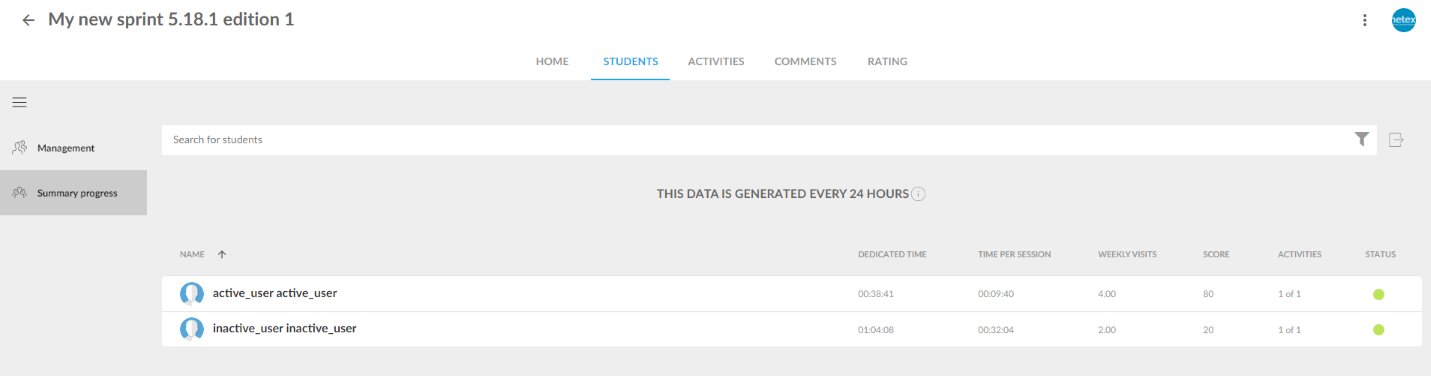
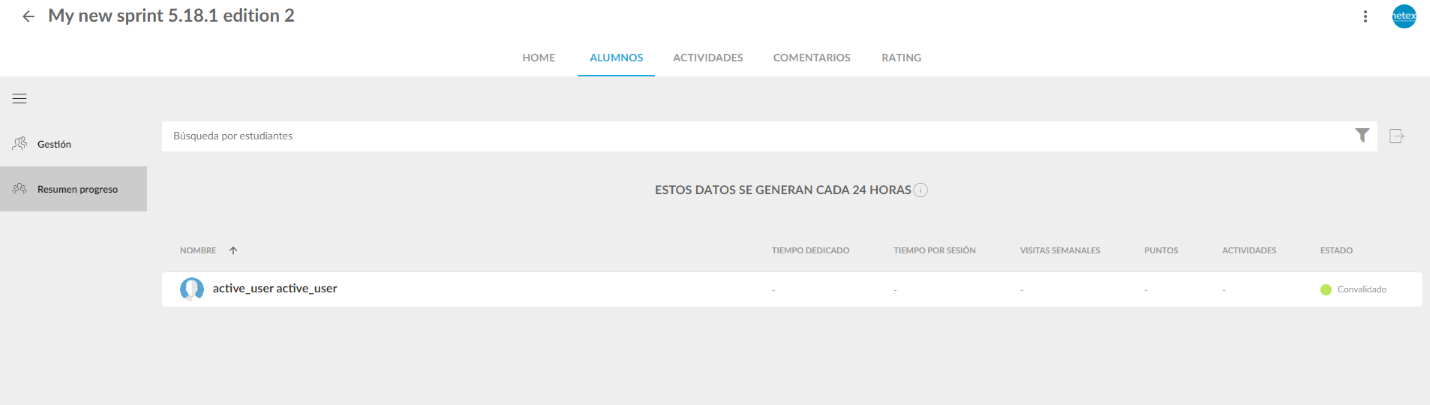
Information about validations in the progress summary report and in the user progress detail.

These reports will now show validated status for those users who have completed other trainings of the same sprint and have therefore been validated in this training.

Inactive users.

From this version onwards, the progress of all active users and inactive users who completed the training (or were validated) will be shown in the progress summary report.