
Tag: Job Roles

Netex Cloud. October 2026 Second release

Netex Cloud. October 2026 Second release

New features

SHARE + DRIVE

Reuse your content without uploading it again
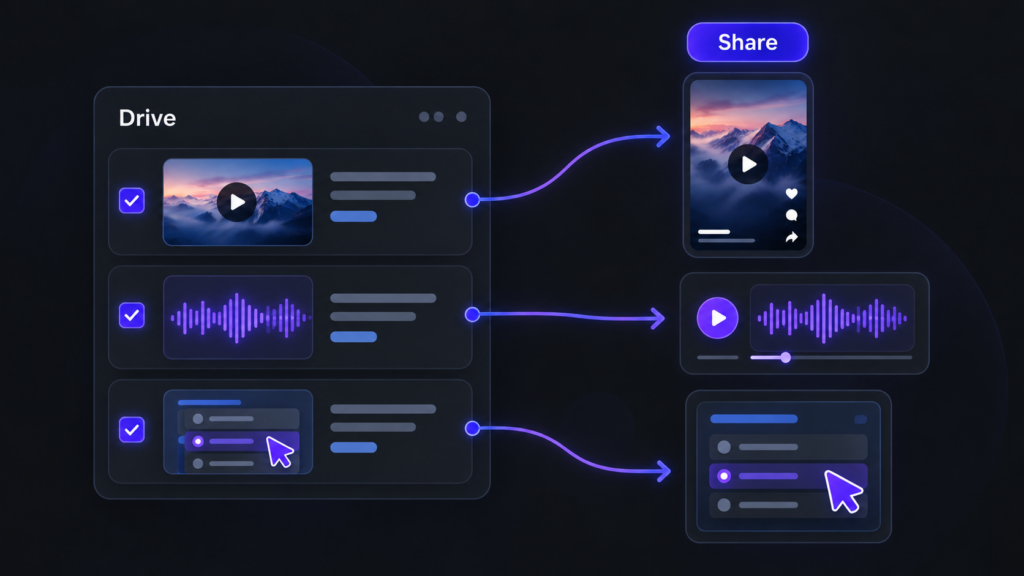
Reutiliza vídeos, audios y recursos interactivos de Drive para crear contenido en Share.

When creating a short, a podcast or an interactive activity, you can now select the video, audio or resource directly from your Drive libraries. You’ll see the most recent resources first and can browse your libraries whenever you need to. The browser only shows resources that match the type of content you’re creating. And, of course, you can still record or upload files as usual.

LEARN

Challenges that show you the way

Within each challenge, you can now see which other challenges each course or learning path contributes to. This helps you identify the training that offers the most value at a glance. Click the challenge icon to open the content details and see all the challenges it belongs to.

AUTOMATE

Automatically mark courses and events as complete

Set up rules to mark courses or events as complete automatically. For example, when someone completes one course, you can automatically mark a second course as complete. This enables fast-track processes and automatic recognition of equivalent training.

This first version supports courses and events only. The completion date will be the date the process runs, rather than the date of the action that triggered the rule, and no learning time will be recorded. Events will be marked as complete without recording attendance.

Improvements

LEARN

Your professional development, one step closer

Your profile now takes you straight to your job position, with no extra clicks. If you have more than one position, you can switch between them using tabs. We’ve also refined the profile design, and your certificates now appear in a list that’s easier to browse.

SHARE

Publish, step by step

We’ve redesigned the publishing forms with a guided wizard: first, choose your material, then add the cover image, title and description. A clearer, faster process with a fresh look for shorts, podcasts, links, articles, interactive activities and playlists.

SHARE

See articles just as your learners will

The new article editor shows you the final result as you write, with all the formatting tools close at hand. What you see is what gets published.

SHARE

Link details, filled in automatically

Paste a URL and Share automatically retrieves the title and image. Want something different? You can change them in moments.

SHARE

Cover images, your way

Choose the video frame that best represents your content or upload your own image, using an improved image picker.

LEARN

Filter and sort your challenges

Filter the content within a challenge by enrolment type (mandatory or recommended) and session status (open or closed), and sort it alphabetically.
Netex Cloud. March 2026 Second Release

Netex Cloud. March 2026 Second Release

Code blocks in the Authoring tool

You can now insert source code blocks directly into content created with Author.

✔︎ Clearer, more professional content that’s much easier to read.

More supported file types in Drive

We’ve expanded the range of supported formats in Drive, so you can work with more resource types from a single place.

New supported formats:

  • Office documents: spreadsheets, presentations and text documents
  • Audio files: such as MP3, WAV and other common browser-compatible formats

For audio files, an integrated player is now available, allowing users to listen directly within the platform. 🎧

✔︎ Greater flexibility to adapt learning assets to different business and tracking needs.

Experts can now use content from Drive

The Experts functionality takes another step forward: it is now possible to add knowledge from Drive directly into an Expert.

Experts can currently use the following as knowledge sources:

  • PDF
  • SCORM
  • xAPI

This enables more enriched responses, combining content not only from the LMS but also from Drive—always respecting each user’s access permissions.

✔︎ More powerful Experts, better connected to your resources and more effective in answering real-world questions.

New tag-based search filter in the LMS

A new search criterion has been added to the LMS: tag-based search.

Users can now find content more precisely using associated tags, in the same way they already do with other search fields.

✔︎ Faster and more intuitive access to the right learning content.

Note: this functionality is available in environments already using the latest version of carousels/search.

Redesigned job role view

The job roles screen has been redesigned to provide a more visual and intuitive experience. Key improvements include:

  • Updated colour scheme for easier reading
  • Visual indicators of current and target levels for each competency
  • More detailed insights when selecting a competency
  • Direct access to related content to continue improving each skill

✔︎ Result: clearer progress visibility and more effective navigation.

Netex Cloud. March 2026 First Release

Netex Cloud. March 2026 First Release

More flexibility in challenge configuration

Challenges now allow you to configure which completions are taken into account to calculate progress:

  • Completions made between the challenge start and end dates
  • Completions made up to the challenge end date

✔︎ This gives you more control to adapt challenges to different business and tracking needs.

Credential recertification

At Netex Cloud, we are taking another step forward to promote continuous learning. You can now configure credentials with an expiration date and activate automatic recertification processes, ensuring that your teams’ skills are always up to date.

What does this new functionality include?

  • Configurable credential validity.
    Define how long a credential will remain active (for example, 6 months) and ensure knowledge stays current.
  • Automatic notifications before expiration.
    Learners receive advance reminders to renew their credential without interruption.
  • Automatic recertification through an exam or course.
    Set up automatic enrollment rules so that users with expired credentials can move directly into the renewal process.
  • New credentials dashboard.
    See which credentials are active or expired and make strategic, data-driven decisions.

What does it mean for your organization?

  • More control and visibility
  • Less manual management
  • Teams that are always up to date
  • Greater value and credibility for your certifications

With this new functionality, credentials in Netex Cloud are no longer static and become a living tool to support continuous professional development.

✔︎ This gives you more control to adapt challenges to different business and tracking needs.

Desired job roles

Learners can now add and remove desired job roles from their profile, as long as this option is enabled for their tenant.

A feature designed to provide more personalization and greater value in tracking professional development.

Expanded information in pathway seat reservations

Pathway sales sessions now display more information about seat availability and status, giving users a clearer view at a glance.

Points hidden when gamification is not active

When gamification is disabled, points are no longer displayed, avoiding confusion and maintaining a more consistent experience.

Esta es la página de Novedades de Netex Cloud. Para conocer el producto en profundidad, visita:

Ir a Netex Cloud