Tag: Certificates

Netex Cloud. April 2025 Second release.

LMS.

Practical Assignments with Real Evidence

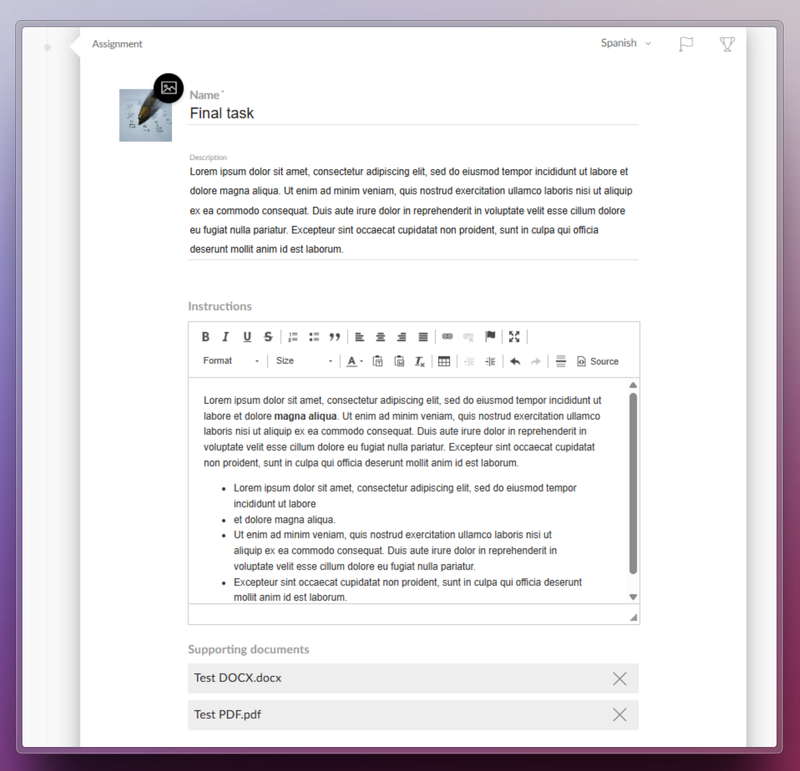
Netex Cloud LMS now includes assessment through practical assignments. Learners can submit files as evidence of learning, allowing instructors to collect and review submissions to evaluate their progress and understanding.

How does it work?

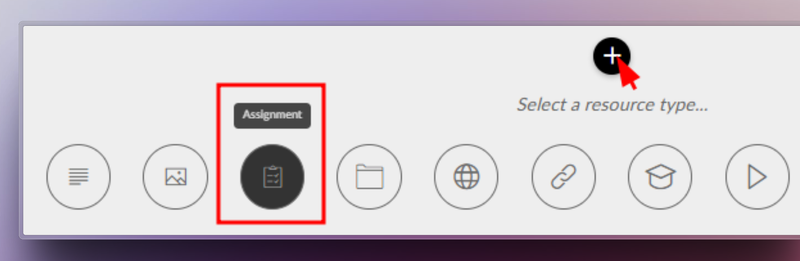
  1. The trainer sets the assignment. They define the title, description, required resources, and whether the learner needs to upload a file as evidence.
  2. The learner submits their work. They view the activity within the course and upload the required files in formats such as PDF, JPG, MP4, DOC, PPT, XLS, ZIP, etc.
  3. Assessment and feedback. The trainer reviews the submitted files, provides comments, and assigns a grade.
  4. Automatic integrations. Gamification rewards are triggered, and the overall course grade is updated for graded activities.

Benefits

  • Authentic assessment: Go beyond tests by evaluating learning through real-world evidence.
  • Complete flexibility: Supports multiple file formats and sizes.
  • Increased engagement: Boosts participation with automatic rewards and instant grading.
  • Seamless experience: Same workflow on web and mobile, with no learning curve.

Turn every submission into a learning opportunity.

Learn more.

Event Certificates: recognise your learners’ achievements

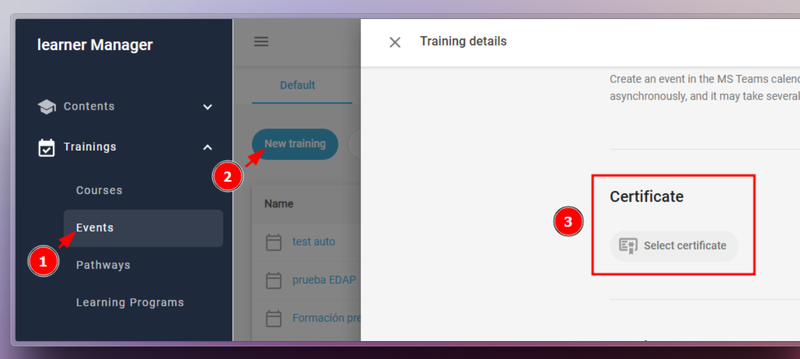
From version 6.54 onwards, Netex Cloud LMS Events can now issue certificates—just like Courses, Pathways, and Learning Programmes.

To enable this, go to Calls > Events, edit the call, and select the certificate you wish to assign.

Manage your certificates efficiently

  • Automatically issue certificates upon event completion
  • Generate or delete certificates in bulk
  • Download copies whenever needed
  • Check the issue or download date for each learner

Learn more.

AUTHORING TOOL

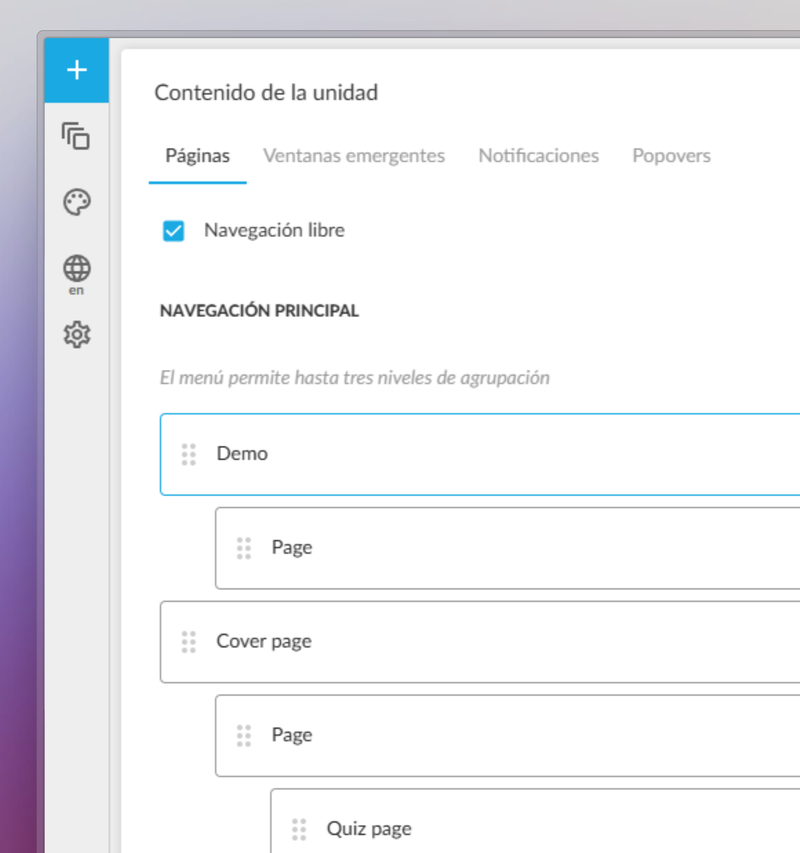
New level-based navigation menu

We’ve enhanced the authoring experience in the Netex Cloud authoring tool with the introduction of a new level-based navigation menu.

Authors can now structure their content in a clearer, more hierarchical and visual way, improving navigation for both creators and learners.

  • Page hierarchy: Organise content by importance and create visually distinct sections or chapters.
  • Full control from the panel: Show or hide pages from the navigation menu with a single click.
  • Section markers: Visually highlight the start of new chapters or thematic blocks, helping learners stay oriented.

Learn more.

Use Question Banks for Assessments

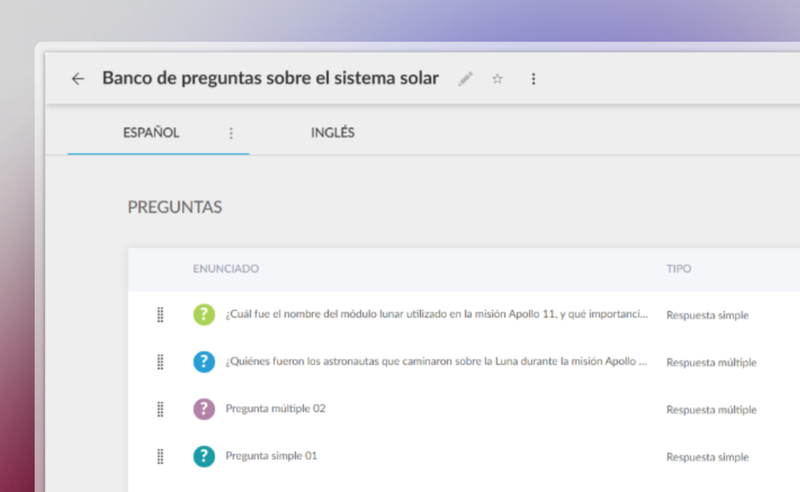
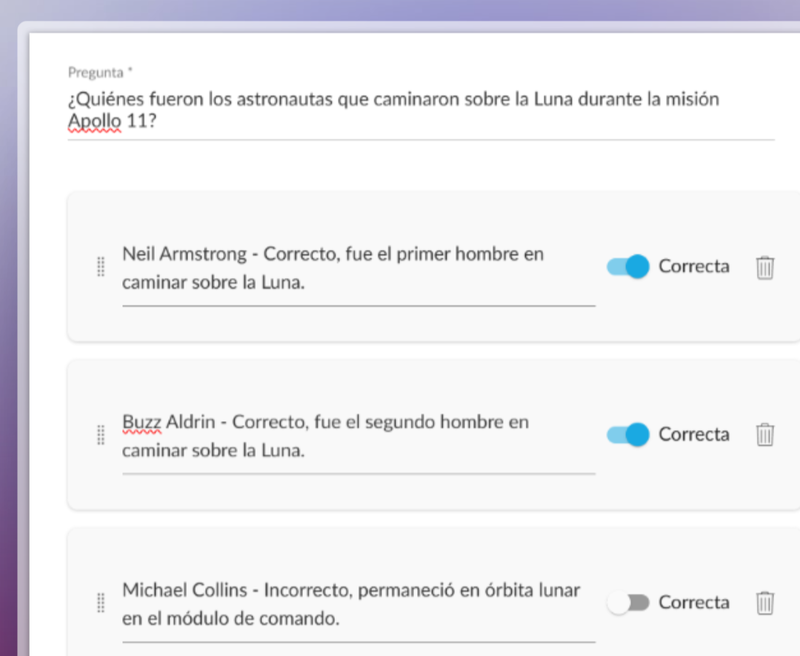
You can now create a centralised question bank in the Netex Cloud authoring tool, with single or multiple-choice questions that can be easily reused across all your content.

Managed from a single repository, updating questions or delegating their maintenance becomes much more efficient—no need to edit each unit individually.

Create dynamic quizzes by defining how many questions to draw randomly from the bank (e.g. 10 out of a total of 50), or how many per category (such as 5 from Maths and 5 from Algebra).

This allows you to offer personalised assessments to each learner—without increasing the author’s workload.

Videos now allow you to set a fixed aspect ratio (16:9, 4:3, 9:16, etc.) to ensure consistent, professional playback tailored to each design.

With these improvements, you gain efficiency, control, and quality in your assessments and multimedia resources.

LC6. November 2024 First release.

Release date: November 6th, 2024 

LMS 

Certificates in Learning Programs

From now on you can also award certificates in Learning Programs, following the same dynamics as for courses and pathways.

More info 

Delete certificates

LMS Admin portal adds the option to delete a certificate so that it can be generated again. This option is useful, for example, if you changed the template and want the student to download the new version.

More info 

LC6. October 2024 First release.

Release date: October 24th, 2024.

LMS.

Downloading Certificates as an Administrator.

Administrators can now directly download user certificates from the Admin Portal. Simply select the desired users and trainings. This feature is available for both general and group administrator.

More information.

Assigning Events to Custom Carousels.

Introducing the feature to assign event trainings to carousels on the learner’s home page. This allows users to view their events organized by date proximity, making it easier for them to plan. Although it does not replace a full calendar, it ensures that upcoming events are displayed in a clear and orderly manner.

More information.

AUTHOR.

Support for right-to-left reading languages.

This update allows content to be automatically adjusted to display properly in languages with right-to-left reading direction, such as Arabic, Hebrew, Persian, Urdu, among others. Texts are aligned and the order of columns and selectors is reversed to adapt the whole experience.

In addition, Professional licensed authors can customize the direction of the content according to their needs.

Subtitle literal change.

The text to disable subtitles has been changed from “disabled” to “off”, providing a clearer and more direct term.

Improved quiz display

Activity statements are now displayed more clearly in a floating window, improving the user experience when navigating quizzes.

LC6. July 2024 First release.

Release date: July 4th, 2024.

LMS.

New Diploma Templates.

You can now choose between classic templates and new diploma templates created with Author. These new templates offer several advantages:

  • They are multi-language, adapting to the needs of all users.
  • They allow different versions of the same template, facilitating customization.
  • Diplomas are generated only once and remain available for download at any time, improving efficiency and user experience.
  • Any author can create their own templates, expanding design and customization options.

This feature is available for all instances with Author activated.

More information.

Important Changes in User Permissions.

  • Attendance Marking by Group Administrators Group administrators can now mark attendance for events for their group members. This improvement streamlines attendance management and allows for more precise participation tracking.
  • Content Publishing by Authors Authors can now publish content without needing validation from a validator. This change grants authors greater autonomy and speeds up the workflow.