Tag: Events

Netex Cloud. April 2025 Second release.

LMS.

Practical Assignments with Real Evidence

Netex Cloud LMS now includes assessment through practical assignments. Learners can submit files as evidence of learning, allowing instructors to collect and review submissions to evaluate their progress and understanding.

How does it work?

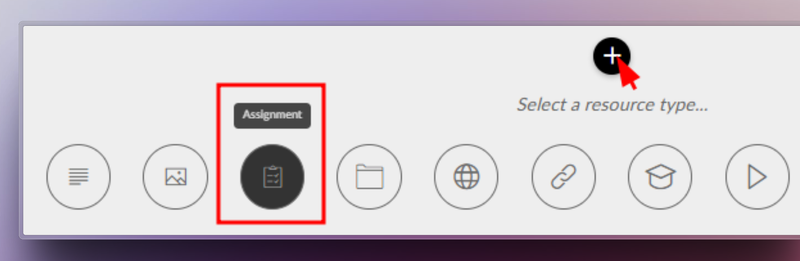
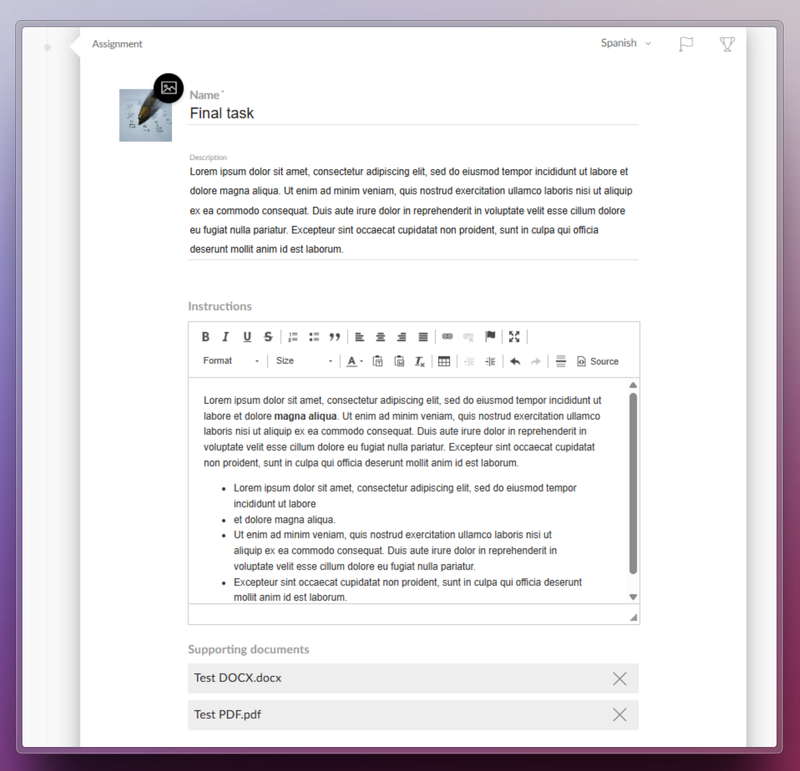
  1. The trainer sets the assignment. They define the title, description, required resources, and whether the learner needs to upload a file as evidence.
  2. The learner submits their work. They view the activity within the course and upload the required files in formats such as PDF, JPG, MP4, DOC, PPT, XLS, ZIP, etc.
  3. Assessment and feedback. The trainer reviews the submitted files, provides comments, and assigns a grade.
  4. Automatic integrations. Gamification rewards are triggered, and the overall course grade is updated for graded activities.

Benefits

  • Authentic assessment: Go beyond tests by evaluating learning through real-world evidence.
  • Complete flexibility: Supports multiple file formats and sizes.
  • Increased engagement: Boosts participation with automatic rewards and instant grading.
  • Seamless experience: Same workflow on web and mobile, with no learning curve.

Turn every submission into a learning opportunity.

Learn more.

Event Certificates: recognise your learners’ achievements

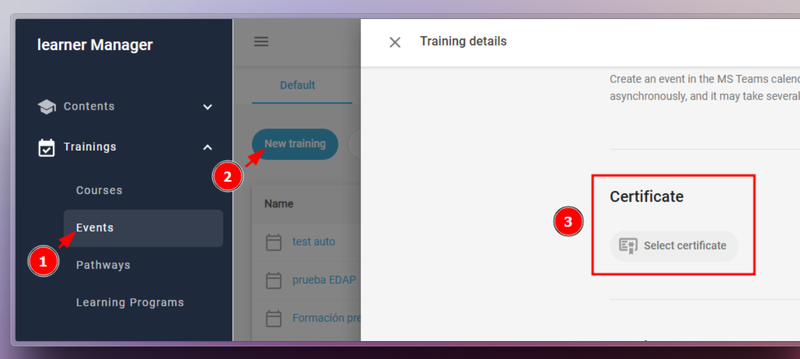
From version 6.54 onwards, Netex Cloud LMS Events can now issue certificates—just like Courses, Pathways, and Learning Programmes.

To enable this, go to Calls > Events, edit the call, and select the certificate you wish to assign.

Manage your certificates efficiently

  • Automatically issue certificates upon event completion
  • Generate or delete certificates in bulk
  • Download copies whenever needed
  • Check the issue or download date for each learner

Learn more.

AUTHORING TOOL

New level-based navigation menu

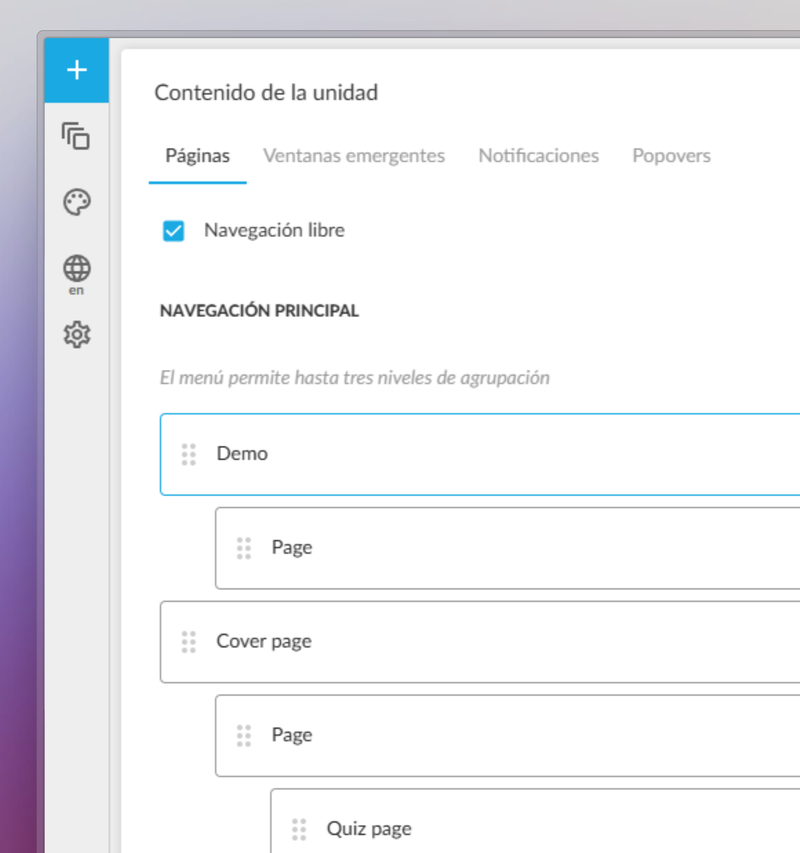
We’ve enhanced the authoring experience in the Netex Cloud authoring tool with the introduction of a new level-based navigation menu.

Authors can now structure their content in a clearer, more hierarchical and visual way, improving navigation for both creators and learners.

  • Page hierarchy: Organise content by importance and create visually distinct sections or chapters.
  • Full control from the panel: Show or hide pages from the navigation menu with a single click.
  • Section markers: Visually highlight the start of new chapters or thematic blocks, helping learners stay oriented.

Learn more.

Use Question Banks for Assessments

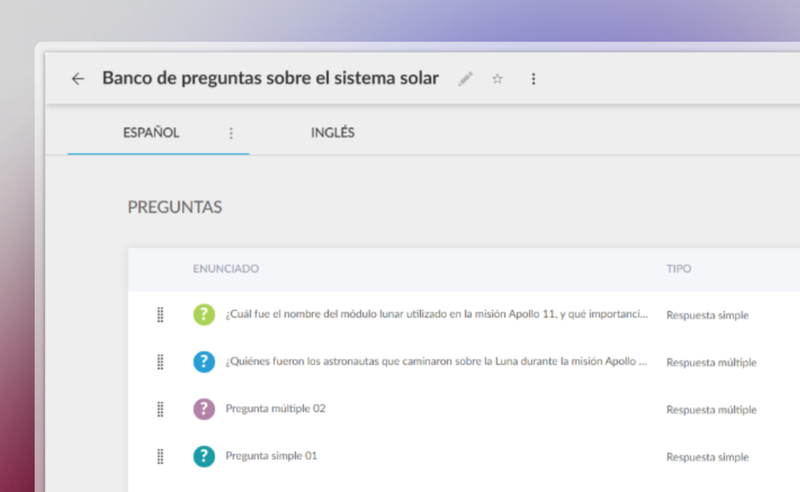
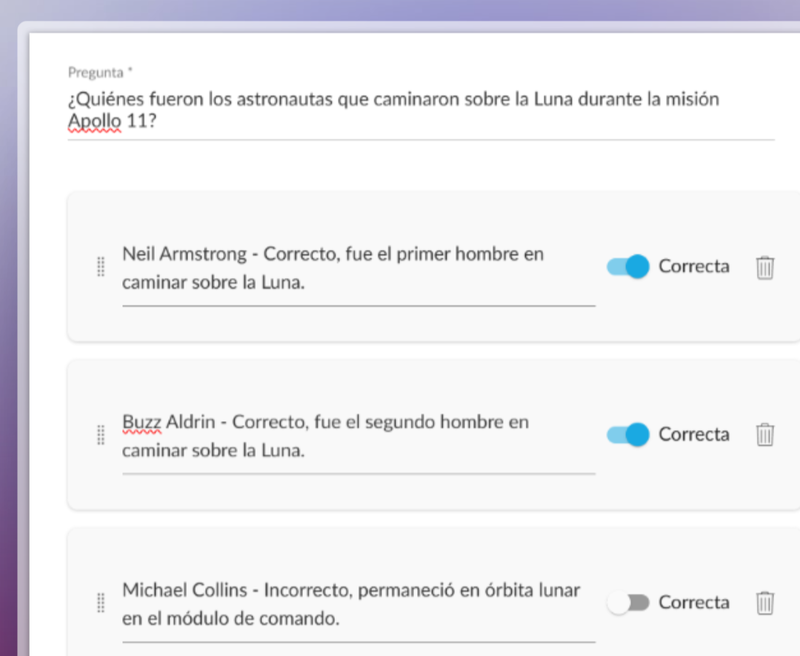
You can now create a centralised question bank in the Netex Cloud authoring tool, with single or multiple-choice questions that can be easily reused across all your content.

Managed from a single repository, updating questions or delegating their maintenance becomes much more efficient—no need to edit each unit individually.

Create dynamic quizzes by defining how many questions to draw randomly from the bank (e.g. 10 out of a total of 50), or how many per category (such as 5 from Maths and 5 from Algebra).

This allows you to offer personalised assessments to each learner—without increasing the author’s workload.

Videos now allow you to set a fixed aspect ratio (16:9, 4:3, 9:16, etc.) to ensure consistent, professional playback tailored to each design.

With these improvements, you gain efficiency, control, and quality in your assessments and multimedia resources.

Netex Cloud. January 2025 First release.

Release date: January 16th 2025.

LMS.

Improve your events and give your users new goals.

Setting the right milestones for your learners is essential to optimize the learning experience and ensure they achieve their objectives.

Thanks to event completeness, you can now: 

  • Set different achievement criteria for each event, adapted to your educational plan. 
  • Set up pathways to mark events as required and ensure that users complete key steps in their training. 
  • Track the overall progress of your team without hassle 

With this feature you’ll also get a detailed assessments to adjust your training strategies, reinforce critical topics and provide better support for those who need it. 

More information.

LC6. October 2024 First release.

Release date: October 24th, 2024.

LMS.

Downloading Certificates as an Administrator.

Administrators can now directly download user certificates from the Admin Portal. Simply select the desired users and trainings. This feature is available for both general and group administrator.

More information.

Assigning Events to Custom Carousels.

Introducing the feature to assign event trainings to carousels on the learner’s home page. This allows users to view their events organized by date proximity, making it easier for them to plan. Although it does not replace a full calendar, it ensures that upcoming events are displayed in a clear and orderly manner.

More information.

AUTHOR.

Support for right-to-left reading languages.

This update allows content to be automatically adjusted to display properly in languages with right-to-left reading direction, such as Arabic, Hebrew, Persian, Urdu, among others. Texts are aligned and the order of columns and selectors is reversed to adapt the whole experience.

In addition, Professional licensed authors can customize the direction of the content according to their needs.

Subtitle literal change.

The text to disable subtitles has been changed from “disabled” to “off”, providing a clearer and more direct term.

Improved quiz display

Activity statements are now displayed more clearly in a floating window, improving the user experience when navigating quizzes.

LC6. March 2024 First release

LMS

Waitinglist in Events

If an event exceeds the maximum capacity, you can create a waiting list for the rest of the users to sign up. The system automatically enrolls them if a place is available, although you can also manage this waiting list manually.

This feature is available for all instances with Events enabled.

More info.

New dashboard: My team

My team manager report moves to Admin Portal, adding new categories with more information, and direct links to the training pages and user profiles.

This feature is available for all instances with Manager Report enabled.

More info.

Automatic synchro of Event attendance

From now on, attendance data is automatically synchronised with MS Teams one hour after the end of the event, no need to do it manually.

This feature is available for all instances with Events and MS Teams integration enabled.

More info.

Course editor opens in new tab

So far the Admin Portal course editor was displayed embedded in the same tab. From now on it will open in a new tab, this improves the security of the platform.

This feature is available for all instances.

LC6. April 2024 First release

LMS

Waitinglist in Events

If an event exceeds the maximum capacity, you can create a waiting list for the rest of the users to sign up. The system automatically enrolls them if a place is available, although you can also manage this waiting list manually

This feature is available for all instances with Events enabled.

More info.

New dashboard: My team

My team manager report moves to Admin Portal, adding new categories with more information, and direct links to the training pages and user profiles.

This feature is available for all instances with Manager Report enabled.

More info.

Automatic synchro of Event attendance

From now on, attendance data is automatically synchronised with MS Teams one hour after the end of the event, no need to do it manually.

This feature is available for all instances with Events and MS Teams integration enabled.

More info.

Course editor opens in new tab

So far the Admin Portal course editor was displayed embedded in the same tab. From now on it will open in a new tab, this improves the security of the platform.

This feature is available for all instances.

LC6. September 2023 First release 

Release date: Wednesday, September 13th.


LMS

Required extended fields in courses

From now on you can mark the new extended fields as required to make them mandatory when creating a course.

Hotjar conector

Integration of Learner Portal with Hotjar, a web application which analyzes the product experience through surveys and other user interactions.


Author

Redesign of the editor interface

Improved design with the most used options at a glance. New sidebar with quick access to page management, pop-ups, color schemes… At the top bar, version management, preview and publishing buttons. Page visibility in the navigation menu is managed from a floating window, more user-friendly for Easy authors.

New theme available: Sidney

Quickly create interactive content adapted to any device, simply by selecting content blocks: text, images, interactive videos, accordions, tabs, galleries and a variety of questions (single and multiple choice, matching, sorting, Likert…).


New Generation

New feature: Events

Discover training events, on-site or online.

New carousels

Deleted Enrolled and Recommended carousels and added new ones News and Mandatories.

Changed Notifications

Instead of use Recommended and Enrolled carousels for get new trainings. From now we use Notifications list in user profile.

LMS. August 2023 Second release

Release date: Wednesday, August 17th.

Integration of Events with Microsoft Outlook

Events is now integrated with MS Outlook and MS Teams. LMS automatically generates a virtual room in Teams when creating an event, and adds a training session to the calendar of all registered users.

Once the event is over, the teacher can synchronize the attendance data between LMS and Teams, showing which users attended and for how long.

More info

Required labed for Courses within Pathways

In Learner Portal, the contents required to complete a pathway, which previously showed the label “Mandatory”, now change to “Required”.

These functionalities will only be available in the new LMS portals (Leaner Portal and Admin Portal).

LMS. July 2023 First Release

Release date: Wednesday, July 19th.

Events

With this new tool you can create face-to-face, virtual or hybrid sessions led by a teacher, and summon the participants.

Both students and teachers have access to the new “Events” carousel at the home page of the Learner Portal, where they can:

  • see the sessions they have been summoned to,
  • register to other available sessions,
  • find out where a face-to-face session is being held,
  • access the virtual room for online sessions.

The trainers, in addition to hold the face-to-face or online session, will be able to access the list of summoned students, and validate their assistance.

This tool is only available in the new LMS portals (Leaner Portal and Admin Portal).

More information